
Course Definitions: Setting the Race Geometry
Define your race geometry: use Predefined templates, reuse existing courses, set reference wind direction, and run automatic mark placement.
Before OutSail.pro can analyze boat performance, calculate Velocity Made Good (VMG), and score maneuvers, the analytics engine needs to understand the physical course layout and the passing sequence of the marks.
You define the course by left-clicking on a Race node in the Tree Menu $\to$ selecting Course definition from the Action Menu popover.
1. The Critical First Step: Setting the Reference Wind Direction (TWD)
Before placing any marks, always set the Reference Wind Direction (deg) in the right-hand panel of the Course Editor:
- Why it matters: The entire sailing race geometry is oriented relative to the wind. The reference wind angle defines the baseline axis for:
- Distinguishing upwind beats from downwind runs.
- Calculating Velocity Made Good (VMG).
- Powering the automatic mark detection algorithms (which look for fleet turning points along the wind axis).
- Direction Convention: Always enter the direction from which the wind is blowing in compass degrees (e.g.,
045°for a North-Easterly breeze,225°for a South-Westerly).
⚠️ Common Trap: If you enter the direction the wind is blowing towards (an error of 180°), downwind legs will be misclassified as upwind legs, reversing all your VMG numbers!
2. Establishing the Course Foundation
You do not need to drop markers one-by-one from scratch on a blank map. Choose one of two fast setup options:
Option A: Choose a Predefined Course (Predefined)
If you sailed a standard racing format:
1. In the toolbar, click Predefined.
2. Select your course layout, e.g.:
* Windward-Leeward with Leeward Gate & Offset Mark (the Olympic standard).
(More predefined layouts will be added in future updates).
3. In one click, OutSail generates the entire course blueprint:
* All required waypoints (Committee Boat, Pin, Top Mark, Offset, Port/Starboard Gate buoys, Finish Line).
* All boundary lines.
* The ordered passing sequence: Start Line $\to$ Leg 1 (Upwind) $\to$ Offset $\to$ Gate $\to$ Finish.
4. Placeholder marks appear on the map, ready for positioning.
* Course Change Check: If mark positions were altered by the race committee during racing, adjust the buoys to their updated positions and modify the segment sequence accordingly. If no changes occurred, proceed to automatic placement.
Option B: Reuse a Course from an Earlier Race (Reuse Course)
If the race committee kept the same course for Race 2 or Race 3:
1. In the new race's Course Editor, click Reuse Course.
2. Select the previous race (e.g., Race 1).
3. The complete course topology, exact GPS mark positions, and lap sequence are copied over instantly.
4. If the wind remained steady, your physical marks are often already in the correct positions! If marks were moved, simply drag them to their new locations.
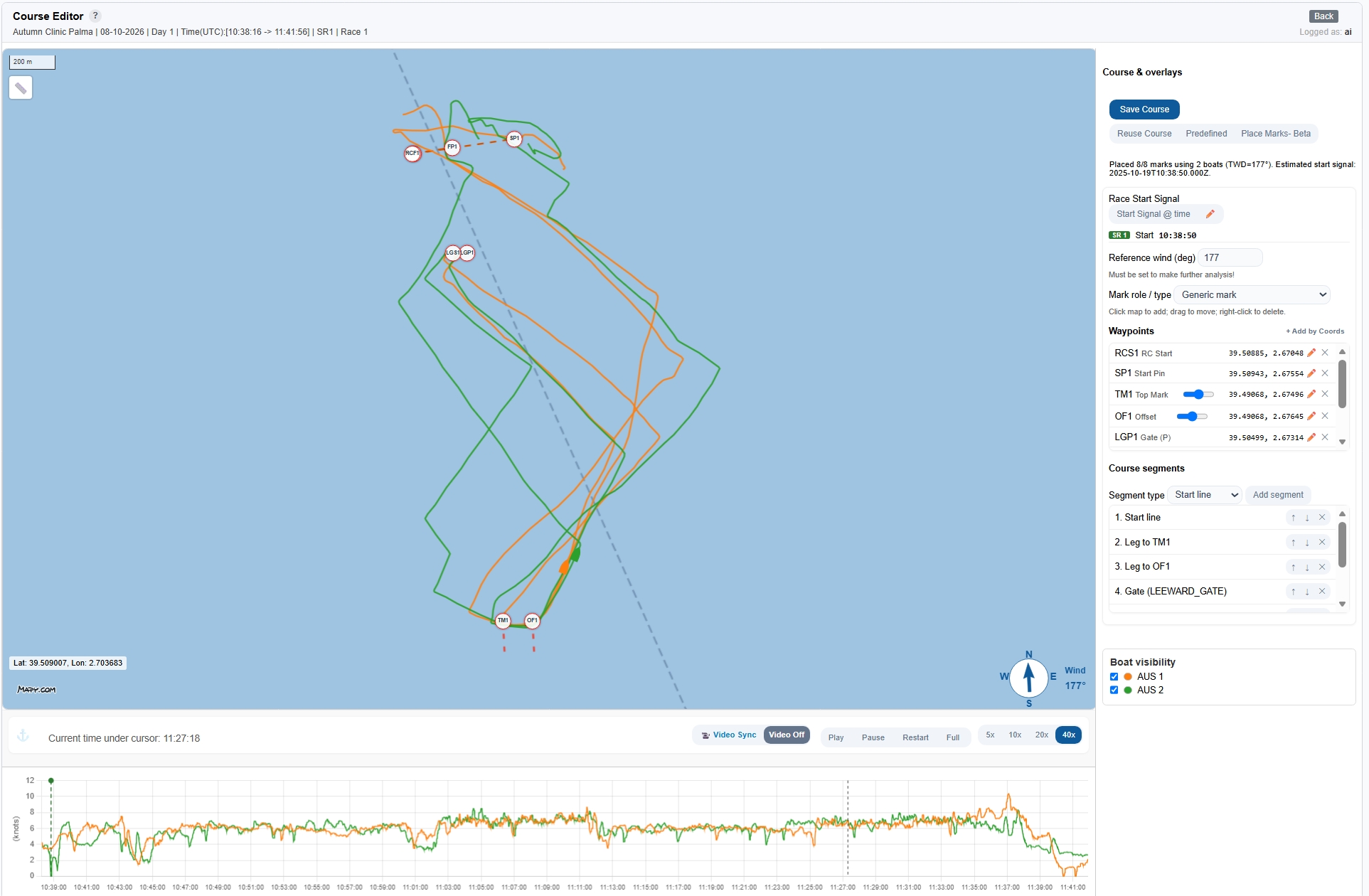
3. Automatic Mark Placement (Place Marks - Beta)
Instead of manually guessing where buoys were anchored on the water, let the fleet's GPS tracks position the marks for you. To use this feature you must have set the reference wind direction and selected a course template with all required waypoints.
- Click the
Place Marks - Betabutton in the toolbar. - All marks on the map automatically snap into their calculated physical positions with high precision.
💡 When to use it: Running Place Marks - Beta is recommended whenever you start from a Predefined template. If you Reused a course from a previous race, you typically do not need to run automatic placement again unless the race committee physically moved the buoys.
4. Visual Inspection & Fine-Tuning
Always spend 30 seconds visually checking the marks against the fleet tracks on the map:
- Top Mark & Offset: Drag the mark so the buoy sits cleanly on the inside apex of the fleet's turning arcs (boats sail around the buoy, typically a few metres outside it).
- Gates: Position the gate marks across the narrowest constriction point ("the waist") where tracks funnel together between the buoys before diverging.
- Start & Finish Lines: Ensure the line endpoints contain the entire fleet. If any boat crossed outside the pin or committee boat, slide the line endpoint so all boats pass cleanly between the markers.
- Start Signal Gun Time (
SR 1 Start): - If you ran automatic mark placement, an estimated start gun time appears on the speed timeline (green dashed line).
- Verify this time by looking at the fleet's acceleration curves, or use the 📹 Video Sync tool to match the exact visual start gun moment from an onboard or coach camera.
5. Saving the Course
Once marks, passing sequence, and start signal are verified:
* Click Save Course in the top right.
The course geometry is permanently stored in the database. All subsequent analysis modules (Leg Analysis, Maneuver Scorecards, VMG graphs, and Race Replay) rely on this saved geometry.