Running Analysis & Course Verification
Trigger the analytics engine, interpret the diagnostic report, correct misplaced marks with zero data loss, and unlock debrief modules.
Once your course is saved in the Course Editor, you are ready to process the race. Left-click on your Race node in the Tree Menu $\to$ select Analyse from the Action Menu popover.
1. How the Analytics Engine Operates
When you click Analyse, the engine processes all boat tracks in the race through an automated, two-pass workflow:
- Pass 1 (Initial Leg & Manoeuvre Detection):
The engine uses your reference wind direction (TWD) and saved course marks to identify start-line crossings, calculate individual leg boundaries, and detect every tack and gybe across the fleet. - Fleet Wind Refinement:
The engine analyzes the bisectors of all upwind tacks executed across the fleet to calculate the true average wind direction on the water. - Pass 2 (Convergence Check):
If the fleet's actual wind direction diverges by more than 5° from your initial reference wind, the engine automatically re-runs the analysis using the refined wind axis. This guarantees that your Velocity Made Good (VMG) and leg statistics reflect real conditions rather than an estimate.
2. Automatic Course & Start Verification (Diagnostics Report)
The analysis engine does not merely compute numbers—it actively audits your course setup against physical GPS tracks.
If any discrepancies are detected between your course layout and what the boats actually did, a color-coded Diagnostic Report appears at the top of the analytics page:
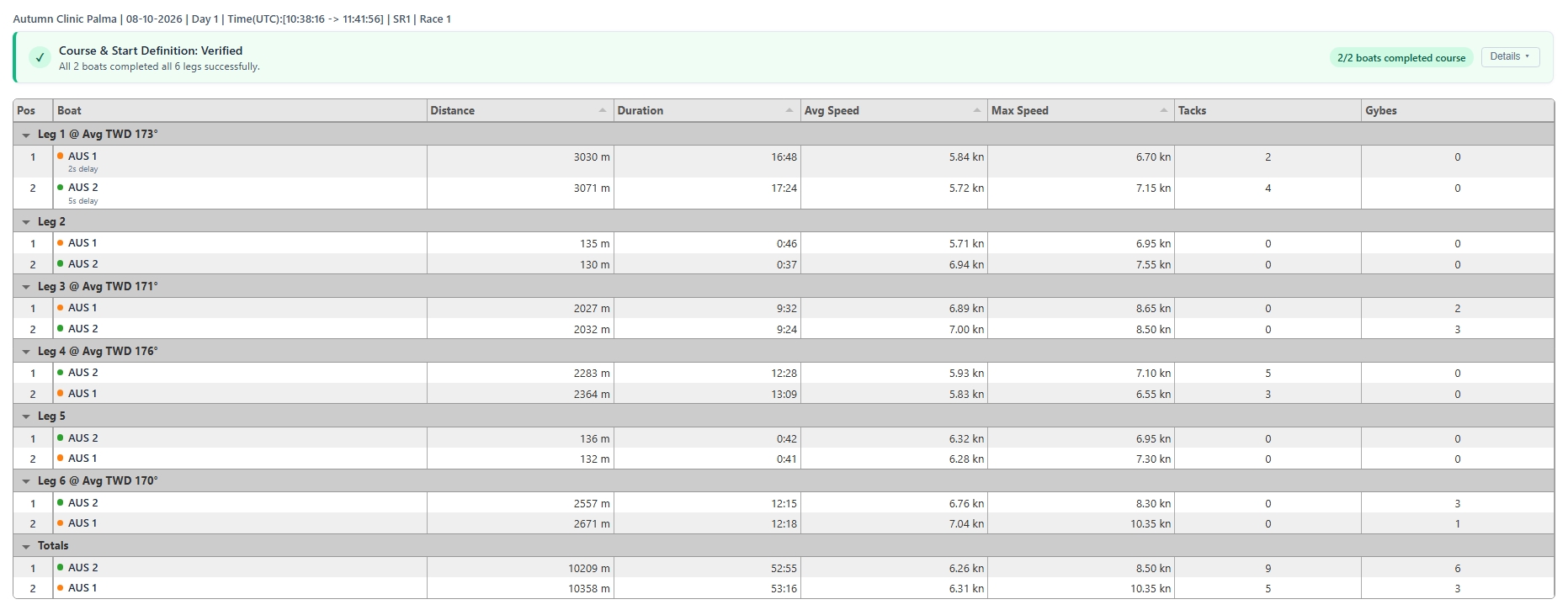
- 🟢 All Clear (Green): Every boat started cleanly and successfully rounded all defined course marks in the correct sequence.
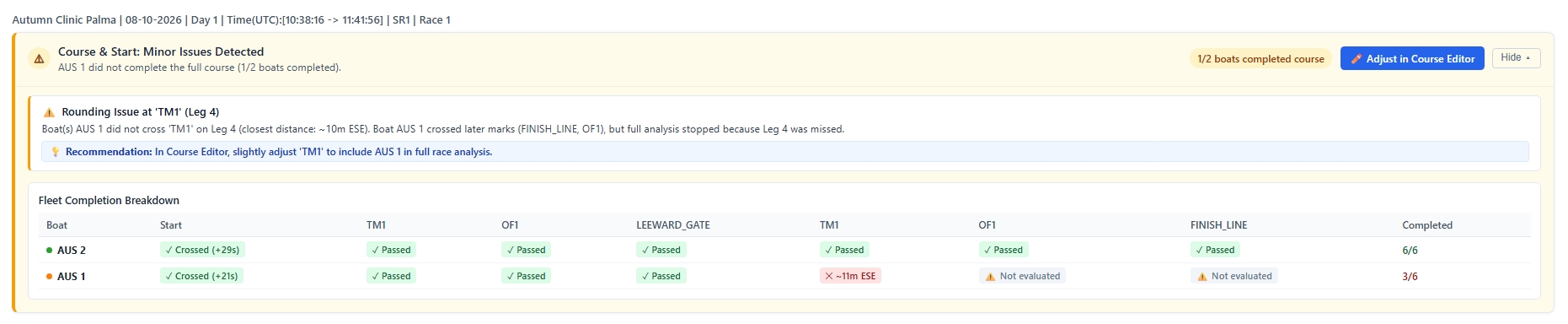
- 🟡 Warning (Amber): Partial completion detected (for instance, an individual boat retired/DNF, sailed wide of a mark, or experienced minor start timing offsets).
- 🔴 Error (Red): A systemic course definition issue (e.g., more than half the fleet failed to register a mark rounding, or the start gun timing is out of sync).
What Diagnostics Check:
- Start Gun Timing:
- Late Start Signal: The start gun is set after boats already crossed the line.
- Early Start Signal: The start gun is set long before the fleet crossed.
- No Line Crossings: No boats crossed between the committee boat and pin within the expected starting window.
- Mark & Gate Completion:
- Systemic Missed Mark: If most or all boats missed a buoy, the report alerts you and provides the fleet's Closest Point of Approach (CPA) and cardinal direction (e.g., Fleet rounded ~85m NW of Mark 1).
- Cascade Protection: If a boat misses Mark 1, subsequent legs are flagged as ⚠️ Not evaluated (Cascade) rather than creating false error reports for downstream gates.
- Fleet Completion Matrix:
- An expandable table showing every boat's status for every leg (
✓ Passed,✕ Missed ~Xm [Direction], or⚠️ Not evaluated).
3. How to Fix Course Issues and Re-Run
If your Diagnostic Report flags an error or misplaced mark, fixing it takes less than a minute:
- In the Diagnostic Report, click
✏️ Adjust in Course Editor(or selectCourse definitionfrom the Race node in the Tree Menu). - Inspect the flagged area on the map:
- If the report noted Fleet rounded ~85m NW of Mark 1, look at the fleet tracks northwest of the buoy.
- Drag the mark marker into the true center of the fleet's turning arcs.
- If the start line had no crossings, slide the pin or committee boat so all boat tracks pass between them.
- Click
Save Course. - Return to the race and click
Re-analyse(orAnalyse).
💡 Non-Destructive Recalculation: Re-analyzing completely refreshes all leg stats and diagnostic cards without altering or degrading your source GPS data in the Sessions Bucket. You can adjust and re-run as many times as needed until the diagnostic report shows 🟢 All Clear.
4. Exploring Your Race Results
Once your course passes verification, OutSail unlocks the full debrief toolset under the Race node:
View(Race Replay): Watch the 2D race playback with dynamic leaderboard rankings, distance-to-leader deltas, and synchronised telemetry charts.Speed Analysis: Compare boat speed (SOG) and Velocity Made Good (VMG) across boats and legs using clean box-plot distributions (with maneuvers and mark roundings excluded for pure boat-speed evaluation).Wind Analysis: View wind shifts mapped directly over course geography to evaluate whether winners sailed the favored side of the course.Export to PDF: Generate clean, print-ready race summary and maneuver scorecards to hand out to sailors during your post-race debrief.